
Add Money
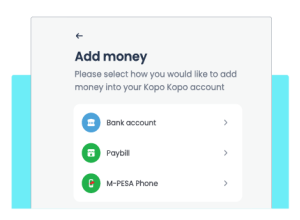
Add money into your Kopo Kopo account easily via Paybill, bank or M-PESA STK Push. Whether you need to manage business payments, repay your cash advance or receive money from customers.
Request payments via M-PESA STK Push
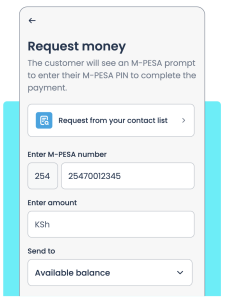
Collect payments by sending a payment prompt directly to your customer’s M-PESA phone number. Your customer simply enters their M-PESA PIN to complete the payment.
Add money through bank deposit
Fund your account via depositing from your bank account using the bank details available on the ‘Add Money’ page on the mobile or web app.
Enjoy a simple 0.55% charge
As a business owner, you will be charged 0.55% when adding money to your Kopo Kopo account. Customers making payments through Paybill will pay the applicable Safaricom Paybill Business Bouquet tariff.
Add money using Paybill
Add money to your account using Kopo Kopo Paybill. Create labels for different payments to help you track your money and manage your payments better.
M-PESA STK PUSH
Prompt your customers via M-PESA STK Push
Collect payments by sending a payment prompt directly to your customer’s M-PESA phone number. Your customer simply enters their M-PESA PIN to complete the payment.
Get more from M-PESA STK Push payment prompts
Your customer does not need to be with you. Send a payment prompt wherever they are and let them pay securely from their phone.
Send payment prompts instantly instead of waiting for customers to enter your Paybill or till details, helping them pay quickly.
Customers receive a payment prompt with the correct payment details, reducing the risk of accidentally paying another business.